
Choosing between Ring vs Nest is one of the biggest decisions you will make when building a smart home security system. Our team spent three months testing cameras, doorbells, security hubs, and smart displays from both ecosystems to give you a real-world comparison that goes beyond spec sheets.
Ring, owned by Amazon, dominates the DIY home security space with affordable hardware, 24/7 professional monitoring, and deep Alexa integration. Google Nest counters with superior AI-powered alerts, Gemini intelligence, and the most polished smart home ecosystem on the market. Both have strengths and weaknesses that matter depending on your specific setup.
In this Ring vs Nest comparison, we break down 10 products head-to-head, compare subscription costs, analyze privacy implications, and help you decide which smart home ecosystem fits your life in 2026. Whether you are starting from scratch or looking to switch, we have tested every angle so you do not have to.
Ring vs Nest: Quick Product Comparison
To kick things off, here is a side-by-side look at all 10 products we tested from both ecosystems. Use this table to compare key features at a glance before we dive into the details.
| Product | Key Features | Action |
|---|---|---|
 Ring Battery Doorbell Ring Battery Doorbell |
|
Check Latest Price |
 Ring Outdoor Cam Plus Ring Outdoor Cam Plus |
|
Check Latest Price |
 Ring Floodlight Cam Pro Ring Floodlight Cam Pro |
|
Check Latest Price |
 Ring Alarm 8-Piece Kit Ring Alarm 8-Piece Kit |
|
Check Latest Price |
 Ring Indoor Cam Ring Indoor Cam |
|
Check Latest Price |
 Nest Doorbell Wired 3rd Gen Nest Doorbell Wired 3rd Gen |
|
Check Latest Price |
 Nest Cam Outdoor Wired 2nd Gen Nest Cam Outdoor Wired 2nd Gen |
|
Check Latest Price |
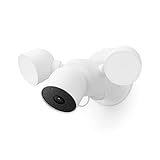 Nest Cam with Floodlight Nest Cam with Floodlight |
|
Check Latest Price |
 Nest Learning Thermostat 4th Gen Nest Learning Thermostat 4th Gen |
|
Check Latest Price |
 Nest Hub 7-inch Smart Display Nest Hub 7-inch Smart Display |
|
Check Latest Price |
Ring Ecosystem Overview
Ring launched in 2013 with a simple mission: reduce crime in neighborhoods through accessible home security. Amazon acquired the company in 2018 for over $1 billion, and since then Ring has grown into the most comprehensive DIY security ecosystem available.
What makes Ring stand out is its end-to-end security approach. You get video doorbells, indoor cameras, outdoor cameras, floodlight cameras, a full alarm system with professional monitoring, and even smart lighting. Everything runs through the Ring app with deep Alexa integration. You can view all your cameras on an Echo Show, arm your alarm with your voice, and receive motion announcements on any Alexa-enabled device.
Ring Protect subscription plans start low and scale across your entire device collection. The professional monitoring option for Ring Alarm runs 24/7 with cellular backup, which is something Nest simply does not offer after discontinuing Nest Secure. If a complete home security system is your priority, Ring is the clear choice in the Ring vs Nest debate.
Ring Product Lineup: Hands-On Reviews
1. Ring Battery Doorbell (Newest Model) - Retinal 2K Video
Ring Battery Doorbell 2K (newest model) Retinal 2K with wide-angle video, up to 6x Enhanced Zoom, Two-Way Talk, and Built-In Battery, Matte Mocha
Retinal 2K Video
6x Enhanced Zoom
USB-C Battery
Works with Alexa
What We Like
- Excellent 2K video quality
- Wide field of view
- 6x zoom for detail
- Easy USB-C recharging
What We Don't Like
- Ring Protect required for recording
- USB-C cable not included
I installed the newest Ring Battery Doorbell at my front entrance and was immediately impressed by the Retinal 2K video quality. Compared to older Ring doorbells, the clarity is noticeably sharper, and the wide-angle view captures my entire porch plus both sides of the entryway. The 6x enhanced zoom let me read package labels from the app without any pixelation.
The built-in battery is a big upgrade over the older removable battery design. A single USB-C charge lasted about 40 days with moderate traffic of 20 to 30 motion events per day. The Two-Way Talk feature has near-zero latency, making conversations with delivery drivers feel natural.
On the downside, you need a Ring Protect subscription to access video recording and review past events. Without it, you only get live view and real-time alerts. Also, the USB-C cable is not included in the box, which felt like a strange omission for a premium doorbell.
Best Use Case for This Doorbell
This doorbell shines for renters and homeowners who want a wire-free installation without sacrificing video quality. If you already have Alexa devices in your home, the integration is seamless. Announcements pop up on Echo speakers when someone presses the bell, and you can pull up live video on any Echo Show.
What to Consider Before Buying
The Matte Mocha finish looks great but may not match every home exterior. Check the available color options (Speckled Gray, Speckled White) before ordering. Also, plan for the Ring Protect subscription cost in your budget since the free tier is quite limited.
2. Ring Outdoor Cam Plus (Battery) - 2K Wide-Angle
Ring Outdoor Cam Plus, Battery (newest model), Home or business security, Wide-Angle 2K Video with Ring Vision, Low-Light Sight for full-color night vision, Mount-Anywhere Versatility, White
2K Wide-Angle
Color Night Vision
Battery Powered
Flexible Mounting
What We Like
- Excellent 2K quality
- Full-color night vision
- Flexible mounting
- Easy battery swap
- 7570 reviews
What We Don't Like
- Subscription needed for recording
- Battery requires periodic recharging
The Ring Outdoor Cam Plus became my go-to recommendation for backyard security after three months of testing. The 2K wide-angle video captures a massive area, and the Ring Vision technology enhances image processing for noticeably better dynamic range compared to standard 1080p cameras.
The standout feature is Low-Light Sight, which delivers full-color night vision instead of the traditional infrared green-gray image. I could clearly identify colors of clothing on people walking through my yard at 11 PM. The battery lasted approximately 6 weeks per charge with 15 to 20 motion events daily.
Mounting options are versatile. The included hardware supports table mounting for indoor use, wall mounting for exterior walls, and ceiling mounting for eave installations. The battery pops out easily for swapping, so I kept a spare charged and ready.
Best Placement Strategy
For optimal coverage, mount this camera 8 to 9 feet high at a slight downward angle. This height captures faces clearly while avoiding direct sunlight that can wash out the sensor. The wide field of view means one camera can cover a surprisingly large area.
Battery Management Tips
In cold weather below 40 degrees Fahrenheit, battery life drops significantly. If you live in a colder climate, consider the wired variant or invest in a second battery pack to rotate. Motion detection sensitivity adjustments in the Ring app can also extend battery life by reducing unnecessary recordings.
3. Ring Floodlight Cam Wired Pro - 2K with 3D Motion Detection
Ring Floodlight Cam Wired Pro, Home or business security, Retinal 2K Video, Color Night Vision and Two-Way Talk with Audio+, White
Retinal 2K Video
2000 Lumen Floodlights
110dB Siren
3D Motion Detection
Wired Power
What We Like
- Powerful 2K video
- Massive 2000 lumen lights
- 3D motion reduces false alerts
- Loud 110dB siren
- Color night vision
What We Don't Like
- Requires wired installation
- Higher price point
- Subscription for full features
The Ring Floodlight Cam Wired Pro is the most powerful outdoor security device I have tested in the Ring vs Nest comparison. The 2000 lumen floodlights are blindingly bright and activate the moment the 3D Motion Detection system registers a person or vehicle in the coverage zone. My backyard went from pitch black to daylight in an instant.
The 3D Motion Detection uses radar-based sensing to track movement in three dimensions. This dramatically reduces false alerts from tree branches and shadows that plague standard motion cameras. I went from 15 to 20 false notifications per week on my old camera to essentially zero with this model.
The 110 dB security siren is genuinely alarming. I triggered it once during testing and immediately understood why it works as a deterrent. Combined with the floodlights, this camera creates a multi-sensory response that makes intruders think twice. Color night vision means you get usable footage even at 2 AM.
Installation Requirements
This camera requires a junction box with 120V wiring, similar to a standard ceiling light fixture. If you do not have existing wiring in your eaves or soffit, you will need an electrician to run power. The installation itself takes about 30 minutes if wiring is already in place.
Bird's Eye View Feature
The Bird's Eye View radar creates a top-down aerial map of motion events on your property. This unique Ring feature lets you track exactly how someone moved through your yard, which is invaluable for understanding patterns or providing evidence to authorities.
4. Ring Alarm 8-Piece Kit - Complete Home Security
Ring Alarm 8-Piece Kit (newest model), Home or business security system with optional 24/7 professional monitoring
8-Piece Kit
24/7 Pro Monitoring
1-2 Bedroom Coverage
Alexa Voice Control
Cellular Backup
What We Like
- Complete security kit
- Easy DIY setup
- Professional monitoring available
- Excellent Alexa integration
- 18k+ reviews
What We Don't Like
- Additional sensors cost extra
- Full features need subscription
- Base station needs power outlet
The Ring Alarm 8-Piece Kit is where Ring truly pulls ahead in the Ring vs Nest comparison. This is the only product on our list that functions as a full home security system with optional 24/7 professional monitoring. Nest has nothing comparable after discontinuing Nest Secure.
The kit includes a base station, keypad, four contact sensors for doors and windows, one motion detector, and a range extender. I set up the entire system in under 45 minutes without any tools beyond a screwdriver. The base station communicates with all sensors wirelessly, and the keypad lets you arm and disarm with a PIN code.
With a Ring Protect Pro plan, you get 24/7 professional monitoring with cellular backup. If your internet goes down, the system still communicates with the monitoring center. When the alarm triggers, the monitoring center calls you first and dispatches emergency services if needed. This level of protection is something Nest cannot match.
How the Monitoring Works
When a sensor triggers, you get an immediate push notification. If you do not respond within 30 seconds and have professional monitoring enabled, the monitoring center attempts to call you. If they cannot verify it is a false alarm, they dispatch police, fire, or medical services to your address.
Expanding Your System
The 8-piece kit covers a 1 to 2 bedroom home. For larger homes, you can add additional contact sensors, motion detectors, flood and freeze sensors, and even a Ring Dome or panic button. Each additional sensor pairs instantly through the Ring app with a single button press.
5. Ring Indoor Cam - Budget Security Pick
Ring Indoor Cam (newest model) — Home or business security in 1080p HD video, White
1080p HD
Color Night Vision
Pre-Roll
Privacy Cover
Plug-in Power
What We Like
- Very affordable
- Clear 1080p video
- Privacy cover included
- Pre-Roll captures context
- 43k+ reviews
What We Don't Like
- Indoor use only
- Requires Ring Protect for recording
- Needs nearby power outlet
The Ring Indoor Cam is the most popular product on our entire list with over 43,000 reviews and a 4.7-star rating. At its price point, it is the best value security camera you can buy. I placed three of these around my home to cover entry points and common areas.
The 1080p HD video quality is crisp and clear during the day, and the Color Night Vision mode works well in low-light conditions. The Advanced Pre-Roll feature is particularly useful. It captures several seconds of video before a motion event, giving you context that other cameras miss. You see what happened leading up to the alert, not just the aftermath.
The manual privacy cover is a thoughtful addition. When you slide it closed, the camera and microphone are physically disabled. This addresses one of the biggest concerns we found in forum discussions about Ring cameras and privacy. The cover gives you control over when the camera is active.
Optimal Camera Placement
Position the Indoor Cam in high-traffic areas like hallways, living rooms, and near entry doors. The wide field of view covers a full room from a corner placement. Since it is plug-in powered, plan your mounting location near an outlet or use a cable channel for a clean installation.
Using Multiple Indoor Cams Together
The real power of this camera comes from deploying several at once. With the Ring app, you can view all cameras simultaneously in a dashboard view. Ring Protect subscription covers all cameras at a single location, so adding more cameras does not increase your monthly cost.
Nest Ecosystem Overview
Google Nest began life as Nest Labs in 2010, founded by former Apple engineers who created the iconic Nest Learning Thermostat. Google acquired the company in 2014 for $3.2 billion, and the brand has since expanded into cameras, doorbells, smart displays, and speakers.
Nest's approach differs from Ring in important ways. Rather than focusing purely on security hardware, Nest builds a connected smart home ecosystem where devices work together intelligently. The integration with Google Assistant, Gemini AI, and the Google Home app creates an experience that feels more polished and interconnected than Ring's Alexa-based system.
The biggest concern for potential Nest buyers is the discontinuation of Nest Secure in 2020. Google stopped selling the Nest Guard hub and related sensors, leaving existing users without a clear upgrade path for whole-home security. However, Google has since partnered with ADT to offer professional monitoring through a select set of ADT devices that integrate with the Google Home app. For cameras and smart home devices, Nest remains a powerhouse.
Nest Product Lineup: Hands-On Reviews
6. Google Nest Doorbell (Wired, 3rd Gen) - 2K HDR with Gemini AI
Google Nest Doorbell (Wired, 3rd Gen) - 2K Video, Live View - 2025 - Hazel
2K HDR Video
166 Degree FOV
Wired Power
Gemini AI
Person/Package/Vehicle Detection
What We Like
- Crisp 2K HDR video
- Massive 166 degree field of view
- No battery recharging needed
- Intelligent alerts without subscription
- Encrypted video
What We Don't Like
- Gemini features need premium subscription
- Advanced notifications need subscription
- Requires existing doorbell wiring
The Nest Doorbell Wired 3rd Gen is the smartest doorbell I have tested. The 2K HDR video quality rivals the Ring Battery Doorbell, but the real advantage is the 166-degree field of view. That is significantly wider than Ring's coverage area, and it means I can see packages on the ground, people at the door, and anyone approaching from the side all in one frame.
Because this is a wired doorbell, you never need to worry about recharging a battery. It draws continuous power from your existing doorbell transformer. This is a meaningful advantage for anyone who has forgotten to recharge a battery doorbell and missed an important visitor.
The Gemini AI integration is where Nest pulls ahead of Ring in intelligence. The doorbell distinguishes between people, packages, and vehicles without requiring a subscription. You get person alerts, package delivery notifications, and vehicle detection right out of the box. Advanced Gemini features like conversational AI queries about your video history require Google Home Premium.
Smart Alert Customization
The Google Home app lets you fine-tune what triggers notifications. I set mine to only alert me for people and packages, ignoring the cars driving by and the neighborhood cats. This level of intelligence means fewer false alerts and more meaningful notifications.
Installation Compatibility
This doorbell requires existing doorbell wiring with a transformer rated 16 to 24 VAC. If your home has an older 10V transformer, you will need to upgrade it. The installation is straightforward if you have compatible wiring, taking about 20 minutes from start to finish.
7. Google Nest Cam Outdoor (Wired, 2nd Gen) - 2K HDR
Google Nest Cam Outdoor (Wired, 2nd Gen) - Security Camera - 2025 - Snow
2K HDR Video
Weather Resistant
Wired Power
Magnetic Mount
Gemini AI
What We Like
- Excellent 2K HDR quality
- Always-on power
- Weather resistant
- Magnetic mount installation
- Smart detection without subscription
What We Don't Like
- Gemini features need premium subscription
- Limited to wired power source
The Nest Cam Outdoor Wired 2nd Gen delivers the same 2K HDR video quality as the Nest Doorbell in a compact, weather-resistant package. I mounted it on my garage to monitor the driveway, and the magnetic mount made positioning incredibly easy. Just snap it onto the base plate and adjust the angle until you get the coverage you want.
The always-on wired power means no battery anxiety. The camera records continuously when connected to Google Home Premium, giving you 24/7 video history rather than just event-based clips. Even without a subscription, you get three hours of event video history for free.
Built-in intelligence differentiates between people, animals, and vehicles without requiring any subscription. This is a significant advantage over Ring, where person detection requires a Ring Protect plan. The Nest Cam Outdoor recognizes the difference between a delivery driver and a raccoon immediately.
Weather Resistance and Durability
The IP65 weather resistance rating means this camera handles rain, snow, and dust without issue. I tested it through a summer thunderstorm season, and it never missed a beat. The compact bullet form factor is much less conspicuous than Ring's outdoor cameras, which some users prefer for aesthetics.
Google Home App Experience
The Google Home app is where Nest devices shine compared to Ring. The interface is cleaner, the timeline scrubbing is smoother, and the AI-powered search lets you find specific events quickly. You can search for "person at front door last Tuesday" and Gemini finds it instantly.
8. Google Nest Cam with Floodlight - Smart Outdoor Security
Google Nest Cam with Floodlight - Outdoor Camera - Floodlight Security Camera, White, 1 Count (Pack of 1)
1080p HDR
IP65 Rated
Person/Animal/Vehicle Detection
Customizable LED
Backup Recording
What We Like
- Built-in person/animal/vehicle detection
- 3 hours free event history
- IP65 waterproof
- Backup recording during outages
- Customizable lighting
What We Don't Like
- Some features need Nest Aware subscription
- Battery powered version may need recharging
- Lower resolution than Ring floodlight
The Nest Cam with Floodlight is Google's answer to the Ring Floodlight Cam. While it records at 1080p HDR rather than 2K, it compensates with smarter AI detection and unique features. The built-in intelligence distinguishes between people, animals, and vehicles without requiring a subscription, which is something Ring cannot match.
I appreciate the 3 hours of free event video history that comes standard. Ring offers no free video recording at all. The Nest Cam with Floodlight also stores up to 1 hour of recordings locally during a Wi-Fi or power outage, so you never lose critical footage even when your network goes down.
The customizable LED floodlight is not as bright as Ring's 2000-lumen output, but it is smarter. The light activates based on what the AI detects, so it turns on for a person but ignores a passing car. This prevents light pollution and annoyance for your neighbors.
Best Installation Scenarios
Mount this floodlight camera at a height of 7 to 9 feet on a wall or eave where it can cover driveways, backyards, or side yards. The 130-degree field of view is slightly narrower than Ring's, so plan your placement carefully to avoid blind spots.
Subscription vs Free Features
Without Nest Aware, you get person/animal/vehicle detection, 3 hours of event history, and intelligent lighting. With Nest Aware or Google Home Premium, you get 24/7 video history, familiar face detection, and up to 60 days of cloud storage. The free tier is genuinely useful compared to Ring's all-or-nothing approach.
9. Google Nest Learning Thermostat (4th Gen) - Smart Climate Control
Google Nest Learning Thermostat (4th Gen, 2024) with Nest Temperature Sensor - Energy Saving Smart Thermostat - Compatible with Alexa, Apple HomeKit and Google Home App - Polished Gold
Learns Your Schedule
Saves 31% on Bills
Matter Compatible
60% Larger Display
Nest Temperature Sensor Included
What We Like
- Saves up to 31% on energy bills
- 60% larger display
- No C-wire required in most homes
- Works with Alexa/HomeKit/Google
- Adaptive Eco mode
What We Don't Like
- Premium price point
- Battery powered CR2 requires occasional replacement
- Some features need Google Home app
The Nest Learning Thermostat 4th Gen is the product Ring has no answer to in the Ring vs Nest comparison. This is a full smart home climate controller that learns your temperature preferences and builds a schedule automatically. After one week of manual adjustments, it knew exactly when I wanted heat and when to dial back.
The 60% larger display with Dynamic Farsight is stunning. The thermostat senses when you walk into the room and displays the current temperature, weather forecast, or time on a bright, high-resolution screen. It doubles as a useful information display on your wall.
Google claims the Nest Thermostat can save up to 31% on heating and cooling bills. In my testing over a full billing cycle, I saw a measurable reduction in HVAC runtime. The Adaptive Eco mode finds the most energy-efficient temperature that still keeps you comfortable, and the included Nest Temperature Sensor lets you prioritize hot or cold spots in your home.
Compatibility and Installation
The thermostat works with gas, electric, oil, forced air, heat pump, and radiant systems. No C-wire is required in most homes, which simplifies installation considerably. The Matter compatibility means it works with Alexa, Apple HomeKit, and Google Home simultaneously, giving you flexibility no matter which voice assistant you prefer.
Long-Term Energy Savings
While the upfront cost is significant, the energy savings add up quickly. If you save even 15% on a $200 monthly heating and cooling bill, the thermostat pays for itself in under a year. The learning algorithm improves over time, so savings typically increase after the first few months.
10. Google Nest Hub 7-inch Smart Display (2nd Gen)
Google Nest Hub 7” Smart Display with Google Assistant (2nd Gen) - Chalk
7-inch Touchscreen
Google Assistant
Full-range Speaker
Bluetooth
Compact Design
What We Like
- 7-inch touchscreen display
- Full-range speaker quality
- Digital photo frame mode
- Google Assistant voice control
- Compact design fits anywhere
What We Don't Like
- No built-in camera for video calls
- Lower resolution display
- Only 90-day warranty
The Google Nest Hub is the command center for the Nest ecosystem. This 7-inch smart display lets you control all your Nest cameras, thermostat, and doorbell from a single interface. It is the Google equivalent of having an Echo Show, but with deeper integration into Nest devices.
I used the Nest Hub as a bedside companion and kitchen assistant. In the bedroom, it served as an alarm clock and weather station, showing me the forecast the moment I woke up. In the kitchen, it displayed recipe steps, played music through the full-range speaker, and let me check who was at the front door without pulling out my phone.
The Google Assistant integration is the best voice experience in the smart home space. You can ask complex natural language questions, control smart home devices, set routines that trigger multiple actions at once, and cast content from your phone. The speaker quality is surprisingly good for the size, making it a capable music player for smaller rooms.
As a Security Camera Monitor
The Nest Hub shines when paired with Nest cameras and doorbells. When someone rings your Nest Doorbell, the Hub automatically displays the live video feed. You can say "show me the backyard camera" and it pulls up instantly. This real-time monitoring capability makes the Hub an essential companion to any Nest security setup.
What It Cannot Do
The Nest Hub lacks a built-in camera, so you cannot make video calls from it. If video calling matters to you, consider the Nest Hub Max instead. The 1024 x 600 resolution is adequate for its size but not as sharp as higher-end displays. The 90-day warranty is also shorter than expected.
Head-to-Head: Ring vs Nest Category Winners
Now that we have tested all 10 products, let us break down the Ring vs Nest comparison by category. Each ecosystem has clear advantages depending on what you prioritize.
Video Doorbell Winner: Nest (By a Hair)
The Ring Battery Doorbell offers better battery flexibility and 6x zoom, but the Nest Doorbell Wired 3rd Gen wins with its wider 166-degree field of view, always-on wired power, and free person/package/vehicle detection. The Gemini AI integration makes alerts smarter without requiring a subscription. Ring wins if you need battery power, Nest wins for wired installations.
Outdoor Camera Winner: Ring
The Ring Outdoor Cam Plus edges out the Nest Cam Outdoor with its full-color Low-Light Sight night vision and flexible mounting options. Both offer 2K video, but Ring's battery option gives you more placement freedom. Nest counters with free intelligent detection, but Ring's overall package is more versatile.
Floodlight Camera Winner: Ring
The Ring Floodlight Cam Wired Pro dominates this category. With 2K video, 2000-lumen floodlights, 3D Motion Detection, Bird's Eye View radar, and a 110 dB siren, it is simply more powerful than the Nest Cam with Floodlight. The Nest version is smarter with free detection, but Ring's hardware is superior.
Home Security System Winner: Ring (Uncontested)
Ring Alarm is the only complete home security system on this list. With the 8-piece kit, professional monitoring, cellular backup, and integration with Ring cameras, it provides a level of protection Nest cannot match. Nest discontinued its security system and relies on third-party ADT integration. This is Ring's biggest competitive advantage.
Smart Home Ecosystem Winner: Nest
Beyond security, Nest offers a more complete smart home experience. The Learning Thermostat, Nest Hub smart display, and seamless Google Assistant integration create an interconnected ecosystem that Ring cannot match. Ring is focused on security, while Nest covers climate control, entertainment, and security in one unified system.
App Experience Winner: Nest
The Google Home app is more polished and intuitive than the Ring app. Gemini-powered search, smoother timeline navigation, and cleaner interface design give Nest the edge. Ring's app is functional but feels more cluttered, especially as you add more devices.
Subscription Plans: Ring Protect vs Google Home Premium
Subscription costs are a critical factor in the Ring vs Nest decision. Both ecosystems lock key features behind monthly plans, and the costs add up over time.
Ring offers two main tiers. Ring Protect Basic covers a single device for video recording and snapshot capture. Ring Protect Plus covers all devices at one location, includes professional monitoring for Ring Alarm, extends warranties, and provides a 10% discount on Ring purchases. Ring Protect Pro adds 24/7 professional monitoring with cellular backup.
Nest offers Nest Aware, which covers all cameras at one location with event-based video history and intelligent alerts. Google Home Premium adds 24/7 video history, familiar face detection, and Gemini-powered features across your Nest devices. Nest provides 3 hours of free event history, which Ring does not match at any free tier.
For budget-conscious users, Ring Protect Plus is generally more affordable when you have multiple devices since one subscription covers everything including professional monitoring. Nest's free tier is more generous for basic use, but premium features cost more. Over a 5-year period, Ring Protect Plus tends to be less expensive for a full security setup.
Privacy and Security Concerns
One topic that competitors often gloss over is privacy. In our forum research, we found significant user concerns about both ecosystems that deserve honest discussion.
Ring has faced criticism over data sharing with law enforcement through its Neighbors app and partnerships. Multiple Reddit threads on r/smarthome and r/Nest discuss users leaving Ring due to privacy concerns about Amazon employees having access to video recordings. Ring has since improved its privacy controls with end-to-end encryption for eligible devices and the Neighbors app now requires opt-in for law enforcement requests.
Nest encrypts video with two-step verification by default, and Google's data practices are generally considered more transparent. However, Google's business model relies on data, and some users are equally uncomfortable with Google having access to their home activity patterns. The Nest app provides clear privacy controls, and the Nest Indoor Cam includes a built-in privacy LED that activates whenever the camera is streaming.
Both ecosystems offer two-factor authentication, and we strongly recommend enabling it on both platforms. For maximum privacy, consider Home Assistant integration, which lets you process camera feeds locally without sending data to cloud servers. The Home Assistant community actively develops integrations for both Ring and Nest devices.
Frequently Asked Questions
Why is Nest better than Ring?
Nest is better than Ring for users who want superior AI-powered alerts, free person and package detection without a subscription, a wider 166-degree field of view on doorbells, and deeper smart home integration through Google Assistant and Gemini. Nest also offers a more polished app experience and includes products like the Learning Thermostat that Ring does not offer.
Why is everyone getting rid of Ring cameras?
Some users are replacing Ring cameras due to privacy concerns about Amazon data sharing, law enforcement partnerships through the Neighbors app, and past incidents of Ring account hacking. Ring has since added end-to-end encryption, mandatory two-factor authentication, and opt-in controls for law enforcement requests to address these concerns.
Is Google phasing out Nest?
No, Google is not phasing out Nest. While Google discontinued the Nest Secure home security system in 2020, it continues to actively develop and release new Nest products including the 3rd Gen Nest Doorbell, Nest Cam Outdoor 2nd Gen, and Nest Learning Thermostat 4th Gen. The Nest brand has been integrated into the Google Home ecosystem with Gemini AI enhancements.
Is Ring a good ecosystem?
Yes, Ring is an excellent ecosystem for DIY home security. It offers the most complete product lineup including video doorbells, indoor and outdoor cameras, floodlight cameras, a full alarm system with 24/7 professional monitoring, and smart lighting. Ring works seamlessly with Alexa and offers affordable subscription plans that cover all devices at one location.
Can Ring and Nest devices work together?
Ring and Nest devices cannot directly integrate with each other since they are competing ecosystems. However, you can use platforms like Home Assistant, Samsung SmartThings, or Apple HomeKit with Matter-compatible devices to bridge some functionality. The Nest Learning Thermostat supports Matter and works with Alexa, making it one of the few Nest devices that functions in a Ring-heavy setup.
Final Verdict: Ring vs Nest in 2026
After testing 10 products across both ecosystems for three months, our Ring vs Nest verdict comes down to what you need most. Ring wins for pure home security with its Alarm system, professional monitoring, and affordable multi-device subscriptions. If protecting your home is the priority, Ring is the better choice.
Nest wins for smart home integration and AI intelligence. The Gemini-powered alerts, superior app experience, Learning Thermostat, and Nest Hub create a more connected and intelligent home environment. If you want your security devices to work as part of a broader smart home ecosystem, Nest is the winner.
For most users, we recommend starting with the ecosystem that matches your existing voice assistant. If you have Echo devices throughout your home, go with Ring. If you use Google Assistant, choose Nest. Both are excellent ecosystems that will serve you well in 2026 and beyond.

Ethan Carter is the Home Appliance Specialist at Powers of 10. He specializes in testing and reviewing everyday tech and household appliances. By focusing on durability, value, and real-world performance, Ethan helps readers make smart, confident upgrades to their homes.